Aims Usage for macOS
Your AI limits, without opening a terminal. One native app provides a menu-bar overview and an optional Edge Dock, using the same accounts and usage data as aims usage.
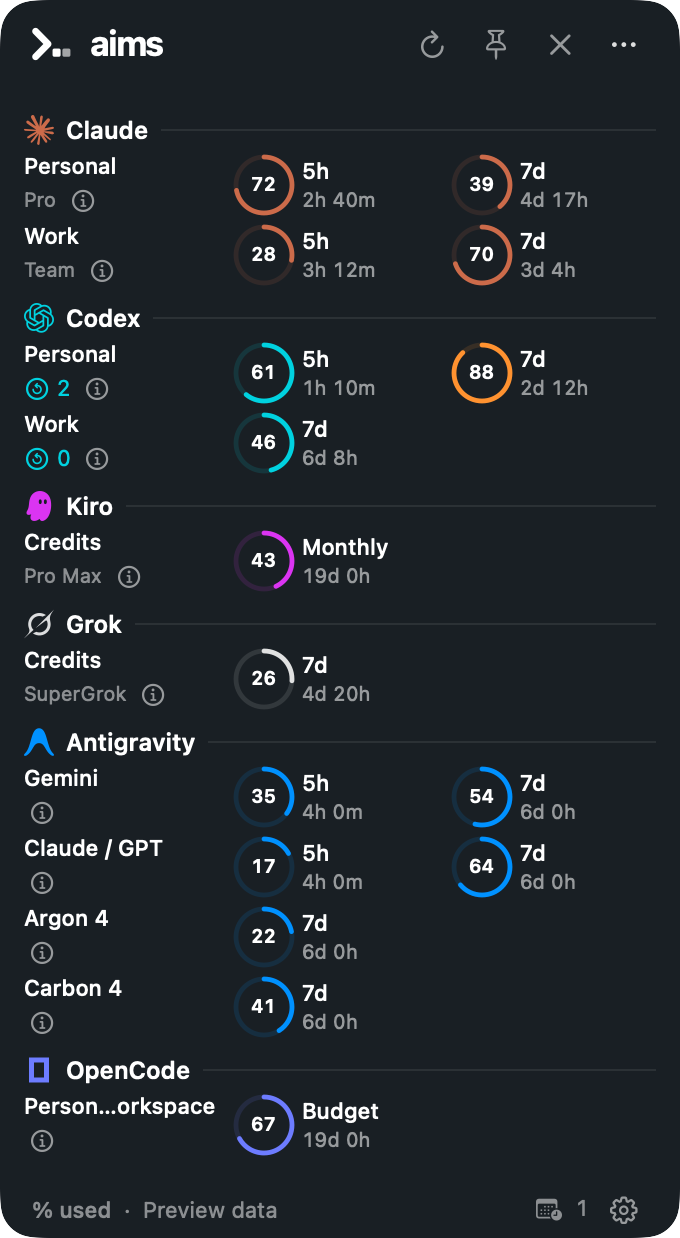

Illustrative preview data. Provider groups and reset inventories appear when reported.
Install the source preview
Public signed downloads, the separate aims-usage Homebrew cask and the automatic-update channel are not active yet. The existing aims package installs the CLI.
With macOS 14.0.0+, Swift 6.2.0+ and the Go version in go.mod, build from a checkout:
scripts/build-macos-app.sh
'dist/Aims Usage.app/Contents/Resources/aims' app install --from 'dist/Aims Usage.app'
"$HOME/Applications/Aims Usage.app/Contents/Resources/aims" app open
The local installer verifies the signature and keeps existing app/CLI installations. It does not replace an installed app automatically. The app bundles its CLI; your accounts, credentials and history stay in their existing homes.
Use aims init to set up Claude/Codex accounts. Authenticate other providers in their own CLIs. For a custom AIMS_HOME, choose that existing folder in Settings → CLI & paths; files are not moved.
Make it yours
| You want to… | Where |
|---|---|
| Choose Compact or Gauges | Settings → General → Usage appearance |
| Choose a screen, edge or vertical position | Settings → Edge Dock → Layout & display |
| Use a smaller Dock and hover card | Layout & display → Mini |
| Hide the Dock until needed | Automatically hide; choose Line, Aims, Logo or Pill |
| Keep the rail visible | Its footer pin |
| Choose 5-hour, weekly, monthly or budget usage | Right-click a provider, or Settings → Usage readings |
| Choose Used or Remaining | Dock options or Usage readings |
| Pick Personal, Work or All | The account chips in provider details |
| Find version, build and links | Settings → Updates & About |
The menu icon and Dock overview button open the same popover. Pin keeps it open; × or Escape closes it. Hover a Dock provider for every account’s readings; click to pin those details. Account chips change the Dock display, not the active CLI login.
A selected display is remembered across rearrangements. If it is disconnected, the Dock temporarily moves to the primary display and returns when reconnected. The menu popover stays attached to the control that opened it.
Understand the readings
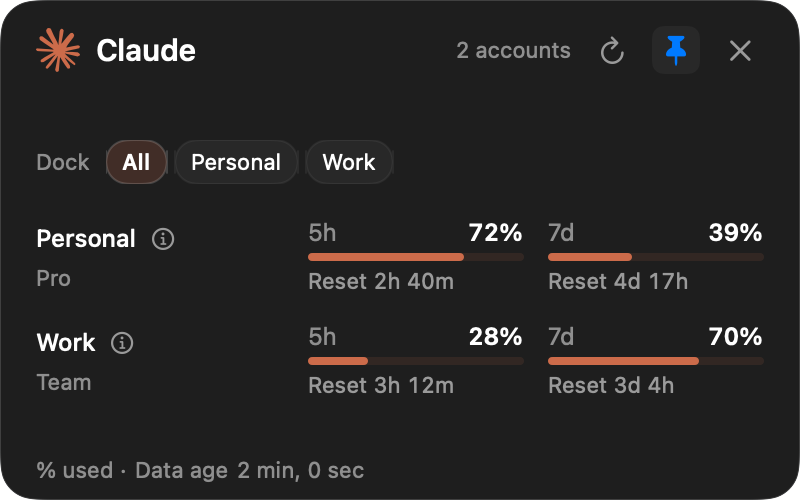
- Refresh reads quotas without a model prompt. Automatic provider refresh runs every five minutes; local cache changes are picked up each minute.
- Not reported means the provider omitted a value or reset time.
- Reset passed means the previous period ended. Refresh to obtain the new reading; the app does not assume zero.
- Banked resets are reported inventory, separate from scheduled resets. The app does not redeem them or buy credits.
- Custom reminders are your own dates, added from More. They do not change provider quotas.
If Claude access expires, use the selected account in Claude Code, then Refresh. Failed reads retain their original age. Provider sources, privacy and cache behavior →
CLI and updates
On macOS, aims app and the dashboard’s m key offer install/open controls. init --app and setup --app include the companion setup. These options do not appear on other operating systems. An absent app is informational in Doctor.
For a direct app install, More → Terminal command… or Settings → CLI & paths can link the bundled command into ~/.local/bin when no CLI exists. Existing commands and shell files are kept.
Sparkle is prepared for future signed releases. Development builds have no update feed. Once activated, it will update the app, Dock and bundled CLI together; standalone aims and provider CLIs keep their own installers. Updating or removing the app preserves accounts, history and reminders.